Automating invoice processing: the hard part isn't reading the invoice

Every accounts-payable team has the same shape of problem. Invoices arrive in every format a supplier can invent — PDFs, scans, photos of paper, emails with the amount in the body — and someone types them into the system, checks them against a purchase order, chases the ones that don't match, and gets the approvals. The typing is boring. The checking is where the money leaks: duplicates, wrong tax lines, terms nobody read, a vendor whose bank details changed last month.
So when a company says it wants to "automate invoices," it usually means the typing. The part worth automating is the checking.
Reading is solved enough
Layout-aware document models now read an invoice they have never seen and return structured fields: vendor, dates, line items, tax, totals, payment terms. They handle the messy formats that used to defeat template-based OCR, and open-source parsers are good enough that the model is rarely the constraint.
That is the easy half. Extraction that is right 95% of the time still leaves you with every twentieth invoice wrong — and no way to know which one.
The system that actually pays off
The useful design has four parts, and only the first one is about reading.
1. Extract, then validate against your own data. A field is not "correct" because the model is confident; it is correct because it agrees with something you already know. Does the PO exist and is it open? Does the vendor match the master record, including the bank details? Has this invoice number been seen before? Do the line items sum to the total? Validation turns extraction into evidence.
2. Route by confidence, not by rule. Every invoice gets a score from the extraction and the validation together, and the score decides who sees it:
- High confidence, everything matches: straight through to approval and the ledger. No human touches it.
- Medium: one field disagrees or the model wasn't sure. A reviewer sees the document and the extracted fields side by side and fixes one thing in one click.
- Low or anomalous: new vendor, changed bank details, an amount far outside the usual range. Full review, by design.
The goal is not zero review. It is review reserved for judgment.
3. Make review fast, and make it teach. The review screen is the product the finance team actually uses, so it deserves to be good: original on one side, fields on the other, corrections in one click, a clear "approve." Every correction is logged and fed back — a vendor's odd layout, a recurring misread — so the same mistake is not made twice. The queue gets shorter every month, and that shrinking queue is the metric.
4. Produce actions, not a spreadsheet. A processed invoice should leave the system as things that happen: a ledger entry with the right coding, a scheduled payment inside the terms, a status the vendor can see, a budget line updated. If the output is a CSV someone re-keys, the automation moved the typing instead of removing it.
What breaks, so you plan for it
Credit notes that look like invoices. Multi-currency and rounding. Handwritten annotations on scanned pages. Suppliers who send the same invoice twice, slightly different each time. A vendor's bank details "updated" by email — which is the one exception that must always reach a person, because that is how invoice fraud works.
None of these are reasons not to automate. They are the list of what the routing rules have to catch on day one.
What to measure
Straight-through rate: the share of invoices no human touched. Exception rate, and what the exceptions were. Days from receipt to approval. Duplicates and mismatches caught before payment. The first three should move in the first month; the fourth is the one the CFO will ask about.
If invoices are one of several places you suspect AI should be doing more, the real question is which one to build first and what your data can support — and that is a question worth answering before anyone writes a line of code.
What we learned prototyping it
We built this as a proof of concept, not for a client: an OCR dashboard with the original invoice on one side and the extracted fields on the other — invoice number, dates, seller and buyer with tax IDs, line items, totals — plus a processed/pending count and the raw JSON one click away. The extraction is what the screenshot shows; the validation and routing described above are the design a production system needs on top of it, and they were not part of the prototype.
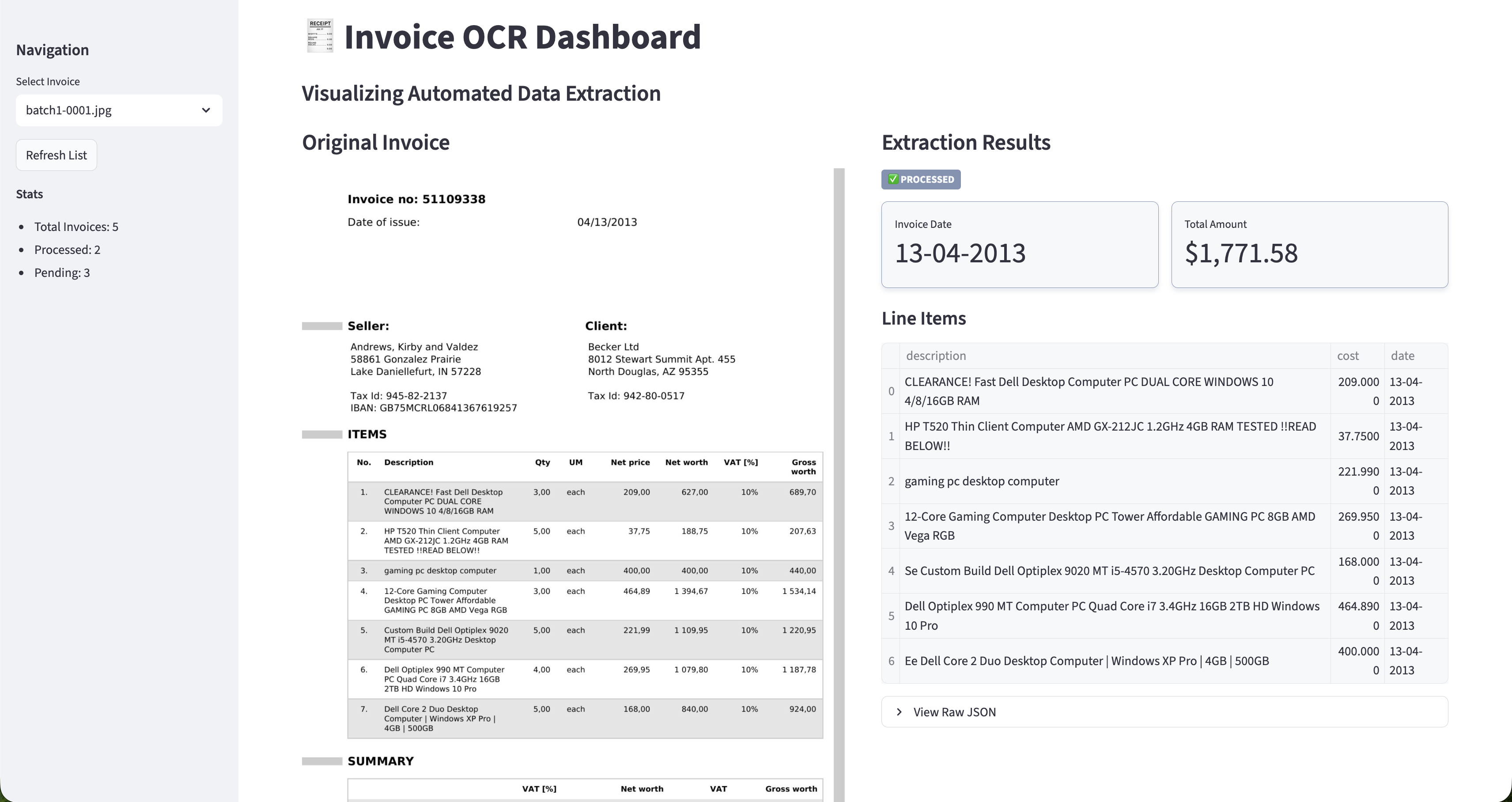
Two things held up under real invoices. The side-by-side screen mattered more than the model: reviewers read the extraction against the document, not in the abstract, and that is the interface a finance team will actually use. And extraction alone, however good, leaves the checking undone — which is the argument of this whole piece. The prototype proved the reading; the checking is the product.